如何在Chrome侧边栏上使用Gemini



直接使用ask gemini
(1) 选择美国节点, Google 账号地区改成美国(是的请跳过)
(1) Select a US node and change your Google account region to the US (skip this step if you already have one).
确认当前账号的国家和地区:点此确认 是美国则不用修改
Confirm the country and region of the current account: Confirm If it's the United States, no modification is needed.
修改当前的账号的国家和地区:网址
注意:修改该项每年仅允许一次,即修改成功后,一年之内不允许再次修改。
Change the country and region of the current account: 提交网址
Note: This item can only be modified once per year. Once modified successfully, it cannot be modified again within one year.
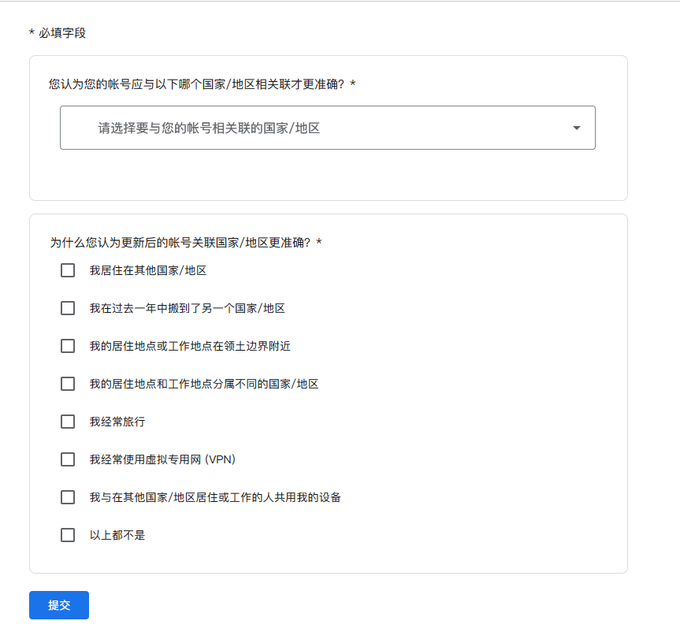
👉重点:勾选最后一个“以上都不是”,参考申请如下:我因工作需要用到xxx,请帮我更改到xxx
👉Important : Select the last option, "None of the above," and refer to the following application: I need to use xxx for work, please help me change it to xxx.
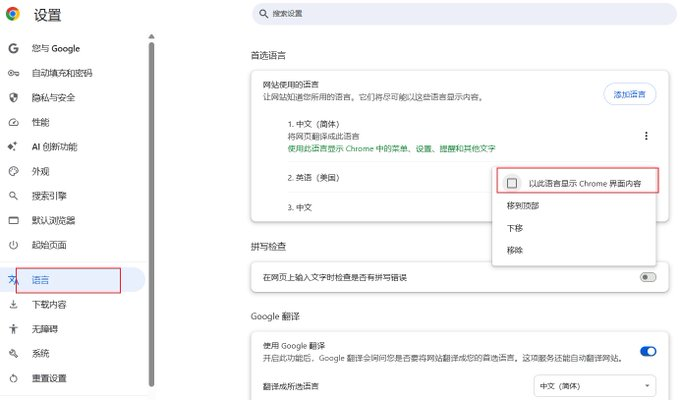
(2) 修改浏览器和Google 账号为英文
(2) Change your browser and Google account to English.
如图设置谷歌账号语言为英语
As shown in the image, set the browser language to English.
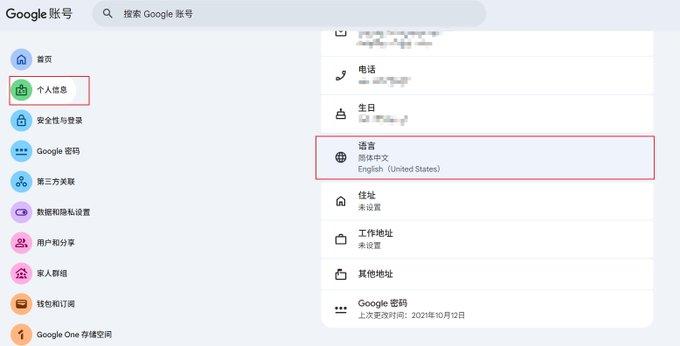
如图设置谷歌账号语言为英语
As shown in the image, set your Google account language to English.
(3) 执行脚本
(3) Execute the script
进入chrome://settings/help 检查下 chrome版本是否是最新, 要更新到最新版本,更新到最新版本后,关闭chrome浏览器,
MacOS 执行以下脚本:
Go to chrome://settings/help to check if your Chrome version is up-to-date. If so, update to the latest version. After updating, close the Chrome browser.
Execute the following script on macOS:
curl -fsSL https://raw.githubusercontent.com/appsail/Gemini-in-Chrome/main/install.sh | bash
Windows 采用poweshell来执行:
Windows uses powershell to execute:
irm https://raw.githubusercontent.com/appsail/Gemini-in-Chrome/main/install.ps1 | iex
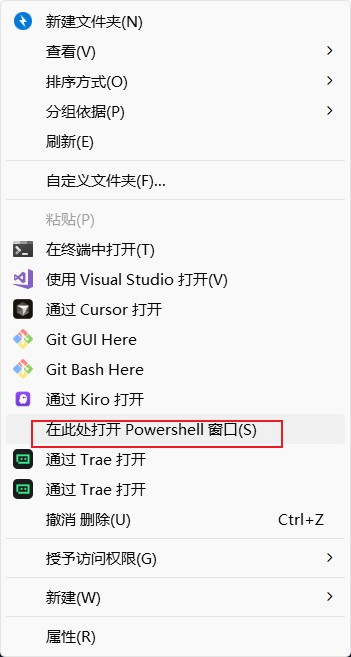
去任意文件夹按住shift 再右键菜单选中powershell,如图
Go to any folder, hold down Shift, right-click, and select PowerShell, as shown in the image.
然后输入脚本回车
再次强调,允许脚本前一定要关闭浏览器!!!
Then type the script and press Enter. To reiterate, you must close your browser before allowing scripts!!!
执行结果如图:
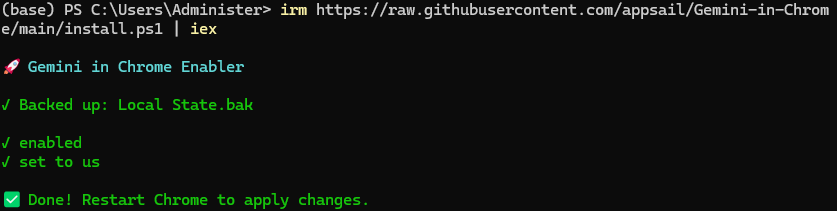
之后再重启浏览器你就可以看到右上角多了一个gemini,然后就可以再任意网页愉快使用Gemini 了再也不用单开一个tab了,
